LinkedIn Sales Navigator for Startup Prospecting
Seed founders need clear ICP filters, not vibes-based targeting at scale.
LinkedIn Sales Navigator is a prospecting tool for finding and reaching the right B2B buyers at scale. This piece is about how seed-stage founders actually use it well, and where most of them get it wrong before they even open the search bar.
Here's the trap. A founder lands three warm intros, closes two of them, and decides they've cracked their ICP. They've found a pattern in a sample size of three, which in statistics is called a coincidence and in startup land gets called "product-market fit."
That pattern-matching works fine when you're doing five outbound touches a week off your own network. It falls apart the second you try to scale it. Manual research per account eats hours a seed team doesn't have. Without consistent filter criteria, there's no repeatable pipeline, just a founder doing vibes-based targeting at increasing volume. And once you start spraying instead of praying, you burn sender reputation and goodwill you'll want back later.
There's a timing problem underneath all of this too. Forrester's research on buying groups puts the modern B2B deal at six to ten stakeholders involved in a purchase decision. Founder intuition, at best, reaches one person: the guy who took your call because you went to college together. That gap, knowing who your customer is versus being able to reliably find and reach more of them, is exactly what Sales Navigator is built to close. It functions as prospecting infrastructure, the plumbing beneath the outreach rather than a cosmetic upgrade to LinkedIn.
What Sales Navigator actually is in 2025 and what seed-stage founders need from it
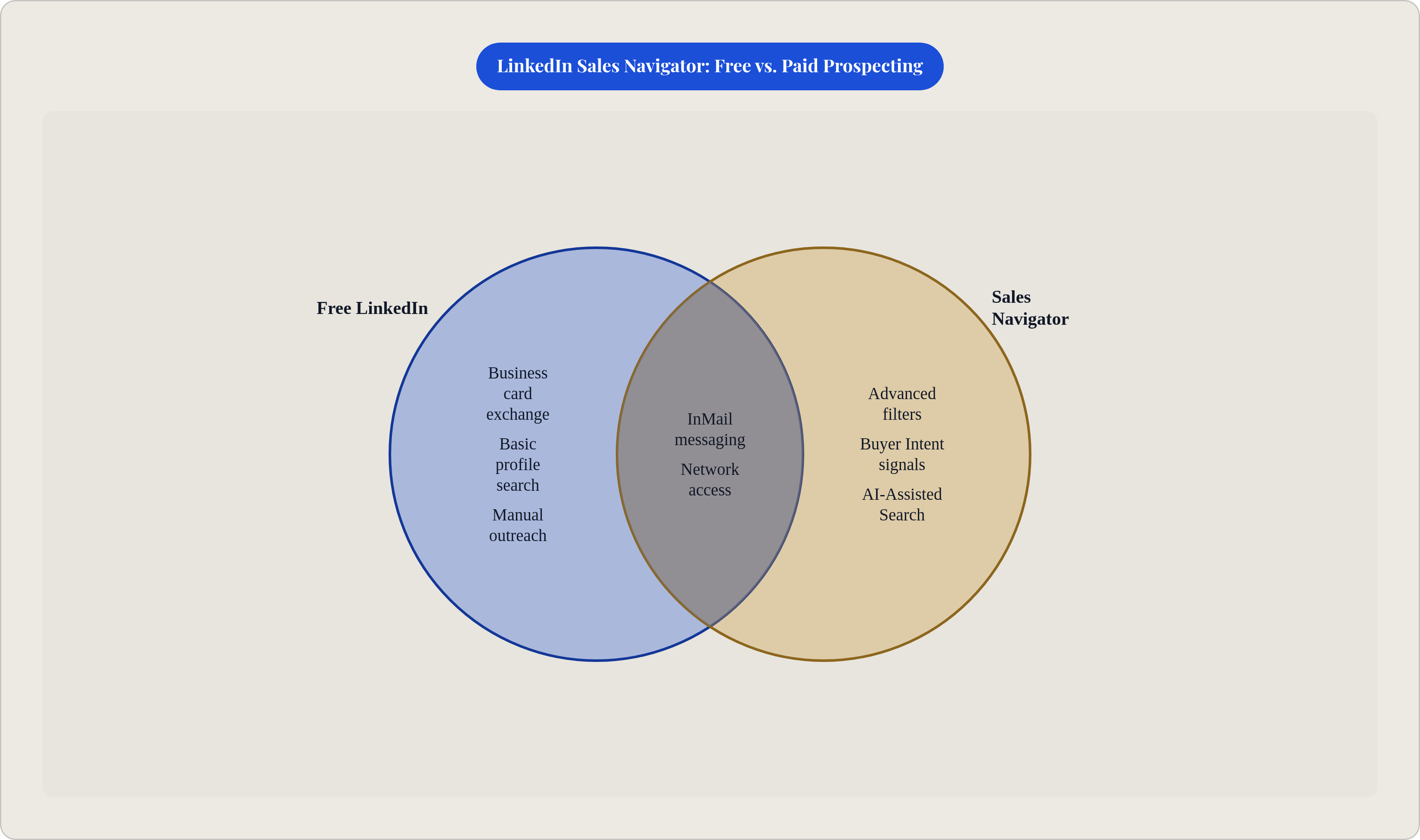
Sales Navigator sits on top of LinkedIn's network of over a billion members and gives you the search, tracking, and outreach layer the free version simply doesn't have. Free LinkedIn functions like a business card exchange, while Sales Navigator adds a searchable filing system on top of that.
There are three tiers, and only one of them matters to you right now. Core runs about $99 a month, built for individual use, and gets you advanced filters, saved searches, and InMail. That's the starting point for almost every seed founder. Advanced adds team collaboration, CRM sync, and Buyer Intent signals, useful once you've got even a small sales function running. Advanced Plus is enterprise-grade integration territory. If you're seed stage and looking at Advanced Plus, you're either extremely well-funded or about to waste a lot of money.
The platform changed meaningfully in late 2024 and into 2025 with a set of AI features worth knowing about. AI-Assisted Search lets you describe your ideal prospect in plain English and it translates that into a structured query, which sounds small until you realize how much time founders waste guessing at filter combinations. Account IQ consolidates account research into a single view, pulling from multiple sources so you stop tab-hopping between Crunchbase, Google, and the company's own website every time you want to check if an account is worth pursuing. Message Assist drafts tailored outreach based on someone's profile, which helps you keep personalization intact even when you're sending at volume.
There's a real number behind the CRM integration piece too. A Forrester study found the CRM sync features save about 15 minutes per user per day. Doesn't sound like much until you remember that at seed stage, the founder often is the entire sales team, and 15 minutes a day adds up to more pipeline hours than most founders realize they're bleeding.
None of this means you need every feature. You need the ones that replace gut-feel targeting with something you can repeat next week without reinventing it.
Building your ICP inside Sales Navigator before running a single search
The single most common mistake is opening the search screen and typing in job titles before anyone's actually defined who buys, which is like walking into a hardware store and grabbing tools before you know what you're building.
A real ICP is more than a title. It's firmographic (industry, headcount, revenue, geography), technographic (what's already in their stack), behavioral (signals of active buying motion), and pain-trigger (the specific problem making them search for a fix right now). Skip any of those four and you're back to guessing with extra steps.
Worth remembering: narrow beats broad, every time, at this stage. HubSpot's early ICP was famously specific, a VP of Marketing at a B2B company with 10 to 200 employees, responsible for lead generation. A single, tightly defined buyer, which let them build product, content, and pricing around one person instead of stretching thin across three imagined personas.
Sales Navigator's Persona feature lets you build that definition once and apply it across every search you run afterward, so you're not rebuilding filter logic from scratch every Tuesday. Most seed teams do well with three to five personas covering distinct buyer types. A SaaS company selling marketing software, for instance, might build separate personas for CMOs at enterprise accounts, VPs of Marketing at mid-market companies, and Marketing Directors at growth-stage startups. Same category of buyer, three very different conversations.
And don't forget the account layer sits alongside the lead layer. A "VP Marketing" at a ten-person startup is a completely different animal than a "VP Marketing" at a ten-thousand-person company, budget authority and all. Combine lead filters with account filters from day one, or you'll end up messaging people who love your pitch and can't approve a purchase order to save their life.
The filters that surface real buying signal instead of raw headcount
There's a real difference between demographic filters (who someone is) and signal filters (why now matters). Title, seniority, geography, company size, and industry tell you who they are, while signal filters tell you whether this is a good week to bother them.
Four Spotlight filters do most of the heavy lifting. "Posted on LinkedIn in the last 30 days" flags people who are actually active on the platform, meaning they're far more likely to see and respond to your message. "Changed jobs in the last 90 days" catches people with fresh budget authority and new priorities, often shopping for vendors to make an early mark. "Follows your company" is the warmest filter on the list, since these people already know who you are. And Buyer Intent, available only on Advanced and Advanced Plus, surfaces companies actively researching solutions in your category. It's the highest-signal filter and the most expensive one, so use it deliberately.
Funding events deserve their own mention as a trigger. A company that just closed a Series B has fresh capital, new priorities, and decision-makers who are actively evaluating vendors, often for the first time in a while. Layer funding intelligence on top of Sales Navigator targeting and you get a real timing advantage instead of cold-calling into a budget freeze.
Set up saved searches with alerts and the whole thing becomes self-refreshing. Instead of running the same search every Monday morning, you get notified the moment a new account or lead matches your criteria. LinkedIn's own data shows that warm introductions through teammates, combined with InMail, can boost buyer response rates up to 5x. That gap is the difference between a cold list and a warm one.
Before you send a single message to anyone on that filtered list, do the five-minute research pass, check their recent posts, their company's recent news, anything that lets your first message reference something real. That step is what separates signal-led outreach from list-blasting with better filters.
How to structure outreach sequences that actually get responses
First rule, and it trips up more people than it should: don't pitch in the connection request, since sending a sales message alongside a connect request tanks your acceptance rate. Send the request with no note, then message once they've accepted.
Message Assist helps here, drafting tailored outreach based on someone's actual profile instead of a copy-pasted template with their first name swapped in. Specificity gets replies, while volume alone gets ignored, or worse, gets you reported.
A sequence that works looks something like this. Connect first, with no note, and once accepted, send a short message referencing something observable, a recent post, a funding announcement, a new job title. Follow that with a value message: one concrete problem you solve for someone in their position, framed as an outcome, not a list of features. Then close with a soft ask, a question that opens an actual conversation rather than a demo request.
The same principle from the ICP section applies here directly. Vague framing like "companies struggling with sales productivity" underperforms something concrete, like the number of hours reps burn on manual data entry instead of actually selling. Specific and visceral beats vague and safe, every time someone's reading a cold message on their phone between meetings.
InMail runs as a parallel track worth using alongside connection requests, especially combined with warm intros through teammates, where LinkedIn's data shows response rates jumping up to 5x. One documented SaaS case pairs precise targeting with tailored messaging and tripled accepted connections in a single month; 20% of those connections went on to book product demos. That's what happens when targeting and message quality move together instead of one propping up the other.
Pairing Sales Navigator with automation tools without triggering LinkedIn's limits
Think of it as a two-tool system: Sales Navigator handles search and filtering, while a separate automation layer, tools like Emelia.io, for example, handles the actual sequenced delivery of your outreach.
Automation is good at replacing repetitive work, the sending, the tracking, the follow-up reminders. It is not good at replacing judgment. It can't tell you whether a signal actually matters or whether a message feels like it was written for one specific person versus a thousand people at once, and that part stays yours.
One documented case paired automation with Sales Navigator and cut time spent on prospecting by half, freeing the team up to spend that time on demos and closing instead. That's worth chasing. But LinkedIn's terms of service have activity limits for a reason, and automation that mimics natural human behavior at low, steady volume is a different animal than bulk-sending at scale. Know exactly where that line sits before you find it the hard way, via a temporary account restriction.
A lower-risk alternative worth considering is alert-driven outreach. Set job posting alerts filtered by industry, company size, and title, then respond fast the moment that trigger fires. No third-party tool risk, and it still gets you first in line when a company's clearly hiring for a role tied to your product.
At seed stage, founder time is the scarcest resource on the balance sheet, scarcer than cash most weeks. A fractional partner who can run these workflows correctly, brand voice intact, often gets to results faster than a founder trying to learn automation tooling from a YouTube tutorial at 11pm.
Turning Sales Navigator activity into metrics investors can read
Here's the part almost everyone skips. Founders do the outreach, they get results, and then they can't actually tell the story of what happened because nobody tracked it in a usable format.
Instrument three things from day one. Pipeline velocity, how fast a lead moves from connection to demo to close. CAC, calculated by dividing total prospecting time and spend by closed accounts; at seed stage, this should be a number you can point to, not a guess you throw out in a board meeting. And MQL-to-customer conversion, meaning what percentage of your Sales Navigator-sourced leads actually become paying customers.
LinkedIn's own campaign data shows ICP-targeted outreach delivers a 68% higher ROI than broad targeting. Apply that same logic to your Sales Navigator lists: narrow and specific outperforms wide and vague, measurably.
The SaaS case from earlier makes a good template for the whole funnel. Tracked connections led to a tracked demo rate (20% conversion), which led to tracked contracts (15 signed in three months), which rolled up into an ARR number a board could actually read. That's the narrative structure investors want to see, backed by numbers rather than impressions.
Seed investors are looking for signs of product-market fit and proof that your acquisition motion is repeatable. Series A investors want proven unit economics and CAC broken out by channel. Sales Navigator, tracked properly, feeds both conversations at once. But you have to build the tracking alongside the outreach. Retrofitting attribution after three months of blasting messages means the data that would have made your growth story credible is just gone.
Where Sales Navigator fits inside a broader seed-stage GTM motion
Sales Navigator functions as infrastructure. It still needs a clear ICP, disciplined channel choices, and an actual conversion path behind it, or it's just an expensive way to message strangers.
The order matters here: ICP first, then positioning, then channels, then instrumentation. Sales Navigator lives in the channel layer, a piece of the system rather than its foundation, and treating it like the foundation is how founders end up with a great tool and no strategy underneath it.
At seed stage, running two or three channels with real discipline produces usable data. Spreading a thin budget across eight channels at once produces noise, and noise doesn't close deals. Sales Navigator works best as one of two focused bets, not one line item in a scattered experiment list.
In the channel stack, outbound through Sales Navigator tends to come early, before content and SEO have had time to build organic inbound. Over time, those two layers start feeding each other, and the "follows your company" Spotlight filter is proof of exactly that: people who found you through content, then show up warm in your outbound list months later.
Done well, Sales Navigator turns founder-led sales into something systematic, saved searches, defined personas, tracked sequences, all of it documented instead of living in the founder's head. That's what makes it possible to hand off later, to a hire or a partner, without losing the muscle memory that got you here. And that handoff only works if the filters are written down, the sequences exist somewhere other than memory, and the conversion data is tracked, not reconstructed from Slack messages six months later.