Outbound Email Sequencing Tools for SMB Sales Teams
Evaluate four core capabilities to match your SMB sales team to the right sequencing tool.

Picking the wrong outbound email sequencing tool as an SMB sales team is an expensive mistake. You either pay for enterprise features you'll never touch, or you hit a ceiling the moment your volume starts to grow. This guide is built for teams of two to fifteen reps who live in the gap between solo founder tools and full enterprise platforms, and it walks through exactly how to match a sequencing tool to the actual motion your team runs.
Most category content reviews tools through one of two lenses: the solo founder doing cold outreach on a shoestring, or the enterprise revenue team with a dedicated RevOps function and a six-figure software budget. SMB teams don't fit either profile. You have real headcount, real pipeline targets, and real constraints: per-seat pricing that compounds fast, CRM integrations that can't require a full-time admin to maintain, and deliverability infrastructure you have to manage without a specialist on staff.
Cold email sequencing is a fast-growing, multibillion-dollar software category. That doesn't mean every tool in it was built for a team of five reps sharing one inbox domain. Market size is not a proxy for product fit. What matters is matching platform capabilities to your specific motion, your specific constraints, and the volume you're actually sending — not the volume a vendor's ideal customer profile assumes you're sending.
The Four Capabilities That Actually Determine Whether a Sequencing Tool Works for an SMB Team
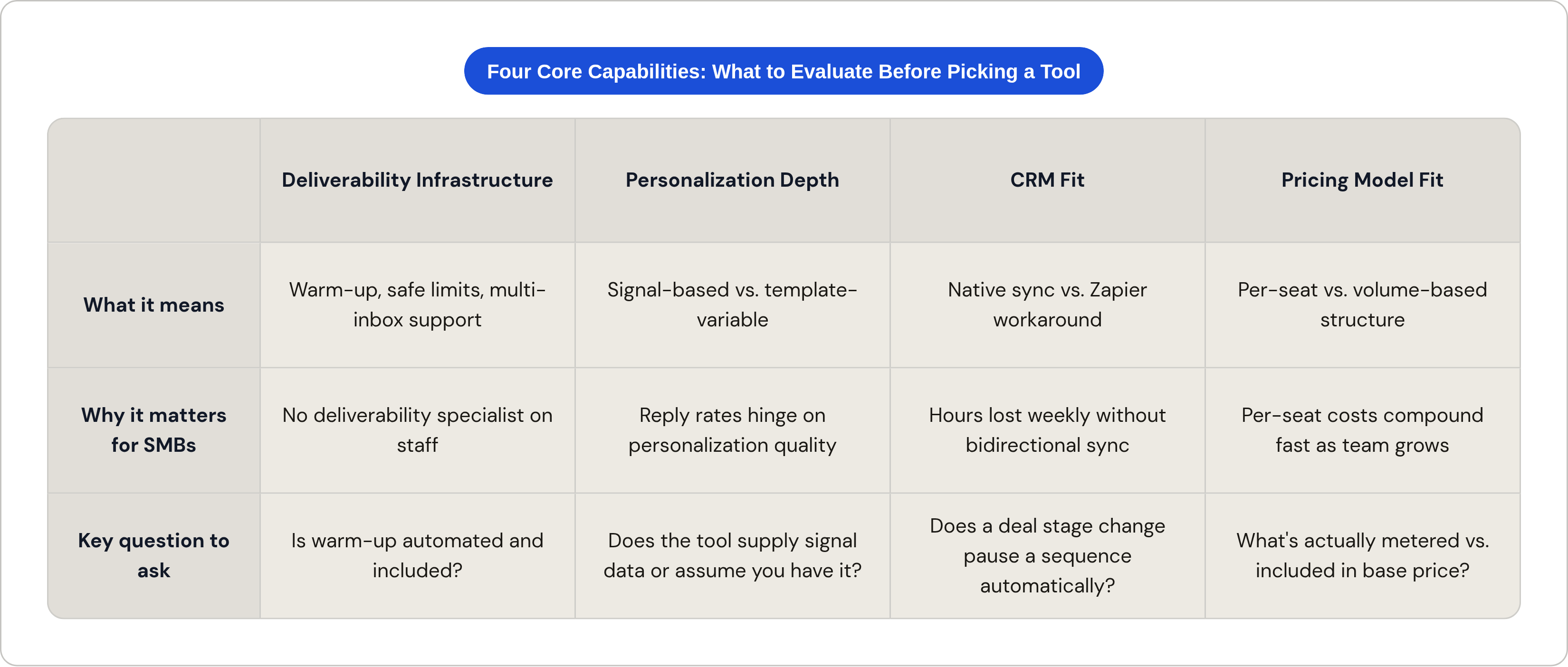
Before picking a tool, you need to know what you're evaluating. There are four capabilities that separate tools that work for SMB teams from tools that just look good in a demo. These aren't nice-to-haves. They are the decision criteria.
Deliverability Infrastructure
Deliverability is the unglamorous backbone of outbound email. If your emails land in spam, nothing else matters.
- Inbox warm-up: Some tools automate this, some make it a manual process, and some charge extra for it. For a small team without a deliverability specialist, automated warm-up that's included in the base plan is a meaningful differentiator.
- Safe sending limits: The industry guideline caps cold email sends per mailbox per day at a relatively low number. Exceeding it triggers spam filters. SMB teams with one or two domains feel this ceiling fast.
- Multi-inbox support: The practical workaround is running several warmed mailboxes simultaneously. Tools vary widely in how many they support and what they charge for it.
Personalization Depth
There are two very different things people call "personalization."
Template-variable personalization is swapping in a first name or company name from a spreadsheet. Signal-based personalization is referencing a prospect's recent funding round, a hiring surge in their engineering team, or a specific technology they just adopted. These produce meaningfully different results.
Across benchmark studies, highly personalized outreach consistently outperforms generic campaigns by a wide margin. Personalization quality moves reply rates more than send volume does. For an SMB team without a dedicated researcher, the practical question is: does the tool help you produce that quality, or does it assume you already have the data?
CRM Fit
Native sync and a Zapier workaround serve different needs. When a rep needs activity logged without manual entry, the difference between those two options shows up in hours lost per week.
HubSpot-native teams and Salesforce-native teams have meaningfully different needs here. But regardless of CRM, the feature that actually saves time is bidirectional sync: sequences pausing when a deal stage changes, contacts routing back to the CRM on reply, tasks created automatically when a prospect clicks a link. That's the feature worth asking about in every demo.
Pricing Model Fit
- Per-seat pricing: Predictable when the team is small, punishing when it grows.
- Volume-based pricing: Better for teams scaling send volume without scaling headcount at the same rate.
- What's included vs. metered: Contact database access, AI personalization features, and inbox warm-up are frequently sold as add-ons. The real monthly cost is often meaningfully higher than the headline price.
Know what you're actually buying before you sign a contract.
What the Benchmark Data Says About What Actually Moves Reply Rates at Small Send Volumes
Here's the uncomfortable baseline: average cold email reply rates across large-volume campaigns are low. We're talking low single digits. That's the floor, and it's not a misprint.
The point that matters for SMBs is this: smaller, tightly targeted campaigns consistently outperform large generic blasts. Research from Belkins' 2025 B2B study shows that campaigns targeting small recipient lists (under roughly fifty prospects) produce meaningfully higher response rates than campaigns run at several hundred or more.
This is structurally good news for SMB teams. Lower volume, tighter targeting, better results. The constraint you've been operating under is also an advantage — as long as your tool supports that kind of precision rather than pushing you toward volume as the primary lever.
A substantial share of total email replies also arrive from follow-up touches, making automated multi-step sequences the functional core of any outbound motion. If you're not following up automatically, you're leaving replies on the table.
A few sequence design principles that hold regardless of which tool you use:
- Shorter emails consistently outperform longer ones
- Send cadence matters. Over-emailing is one of the most common drivers of spam complaints.
- Multichannel sequences (email plus LinkedIn plus phone) produce reply rates that email-only sequences can't match
For tool selection, the implication is clear. You need a tool that supports tight targeting, multi-step conditional logic, and ideally multichannel steps. Raw email volume is not the metric to optimize for. A small team optimizing for precision will consistently outperform a large team optimizing for scale.
Cold-Email-First Tools Built for Teams That Are Still Finding Their Outbound Rhythm
This tier is for teams where outbound is still being figured out. Founders doing early-stage outreach. Small sales pods without a RevOps function. Anyone who needs to be live quickly without a six-week implementation. These tools are built for that reality.
Apollo.io
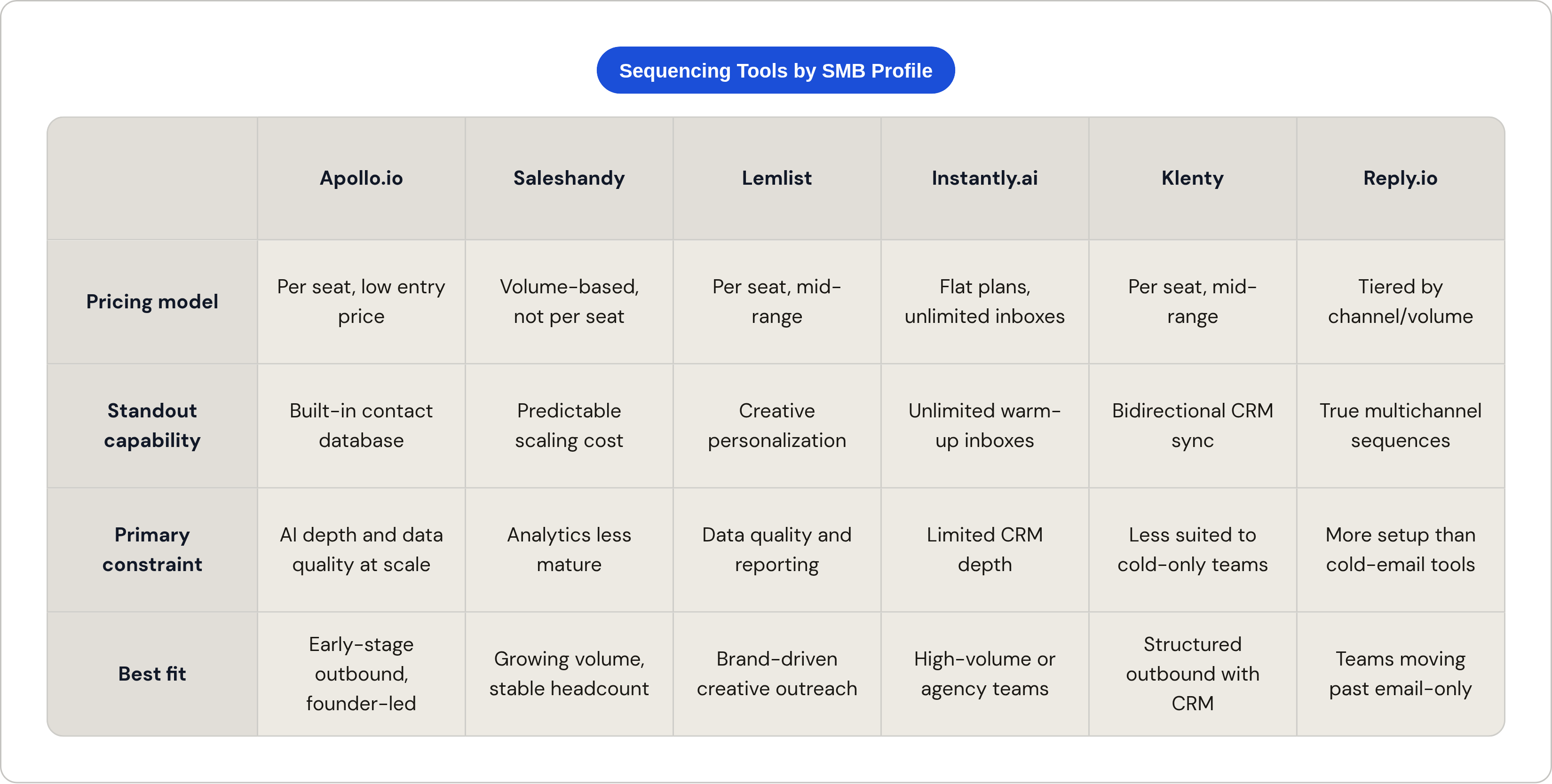
Apollo is usually the first tool that comes up in this category, and for good reason. The free tier and low starting price make it the most accessible entry point. The built-in contact database (with hundreds of millions of records) means you can start prospecting without paying for a separate data tool. Multi-step conditional sequence logic, reply detection, and a Chrome extension that pulls contact data directly from LinkedIn round out the core workflow.
The limitation that shows up as teams scale: database quality and AI personalization depth become more apparent constraints. Apollo works well early; it can feel shallow later.
Saleshandy
Saleshandy's structural differentiator is its pricing model. It's volume-based rather than per-seat, which makes cost more predictable as team size grows. Tiered plans scale sequence and account limits without compounding per-rep costs. There's also a built-in B2B lead finder with a large verified contact database.
Best fit: SMB teams that expect to grow their outbound volume without growing headcount in lockstep.
Lemlist
Lemlist earns its differentiation through creative personalization. Custom images, dynamic landing pages, and video placeholders in email go well beyond variable fields. Semi-automated LinkedIn steps are included, which gives you a low-cost entry to multichannel outreach without jumping to a full enterprise platform.
The constraints: data quality and analytics depth become friction points for teams that grow beyond a handful of reps. Best fit for SMBs where brand voice and creative outreach are central to the motion.
Woodpecker
Woodpecker is doing one thing deliberately: being simple. Fast setup, clean interface, no feature bloat. For a team that's been burned by overbuilt tools, that's actually a selling point.
The conditional sequence logic (routing prospects to a different branch based on link clicks) is more sophisticated than you'd expect at this price point. The safety features for deliverability are strong, which matters for teams that can't afford to burn a domain.
Best fit: SMBs that want reliable cold email automation without the learning curve.
Instantly.ai
Instantly's core proposition is unlimited inbox accounts and automatic warm-up included on all plans. That directly removes the per-mailbox ceiling that constrains volume scaling for most competitors. AI features for personalization, lead finding, and campaign optimization are also included.
Best fit: agencies, freelancers, or SMB sales teams where send volume is the primary constraint and per-inbox costs at other tools would become prohibitive quickly.
Smartlead
Smartlead operates on a similar unlimited-inbox model to Instantly, with plans starting at the low end of the category. Its strongest value proposition is for teams or agencies managing many sending addresses across multiple clients or campaigns simultaneously.
Best fit: high-volume senders where per-inbox cost at competitors would add up fast.
CRM-Anchored Tools for SMB Teams Where Pipeline Management and Sequencing Need to Live in the Same Place
The profile of a team that belongs in this tier: already running a CRM, has a defined pipeline, and needs sequence activity to appear on contact and deal records automatically — right now, not synced via Zapier the next morning.
HubSpot Sales Hub
If your team is already HubSpot-first, the case for HubSpot's native sequencing is operational simplicity. Sequences pause on reply. Activity logs to the contact record. Meetings booked from a sequence link appear on the deal. No integration required because there's nothing to integrate. It's all one system.
Templates, tracking, meeting scheduling, and task workflows live inside the same interface reps already use every day.
The honest limitation: HubSpot's sequencing has inbox and contact enrollment constraints that show up when teams need high-volume cold outreach to prospects outside their existing CRM. For that use case, a specialized cold email tool layered on top is often the right answer.
Best fit: SMB teams that are HubSpot-first and want operational simplicity over raw outbound power.
Klenty
Klenty sits between cold-email-only tools and full enterprise platforms. More capability than Woodpecker, less overhead than Salesloft. It's designed for outbound sales teams that need email automation, call tasks, CRM sync, and prospect engagement tracking in a single cadence tool.
Bidirectional CRM sync is the feature that earns its value here. Rep activity and prospect engagement stay tied together without manual logging.
Best fit: SMB and lower mid-market teams running structured outbound cadences with CRM as the system of record.
Reply.io
Reply.io is where the multichannel argument gets practical for SMBs. Email, LinkedIn, WhatsApp, SMS, calls, and Zapier steps can all live in a single conditional sequence. AI-driven personalization operates at the prospect level rather than the segment level.
Pricing tiers range from email-volume plans to full multichannel to AI SDR, which covers a meaningful range of SMB maturity levels. You're not locked into a plan designed for a team twice your size.
Best fit: SMB teams ready to move past email-only and run coordinated multichannel sequences without enterprise-level overhead.
One point worth underscoring here: multichannel sequences consistently outperform email-only outbound across benchmark data. This tier becomes more important as teams mature past the initial cold email motion and start running coordinated plays across channels.
Where Enterprise Platforms Like Salesloft and Outreach Sit Relative to SMB Needs
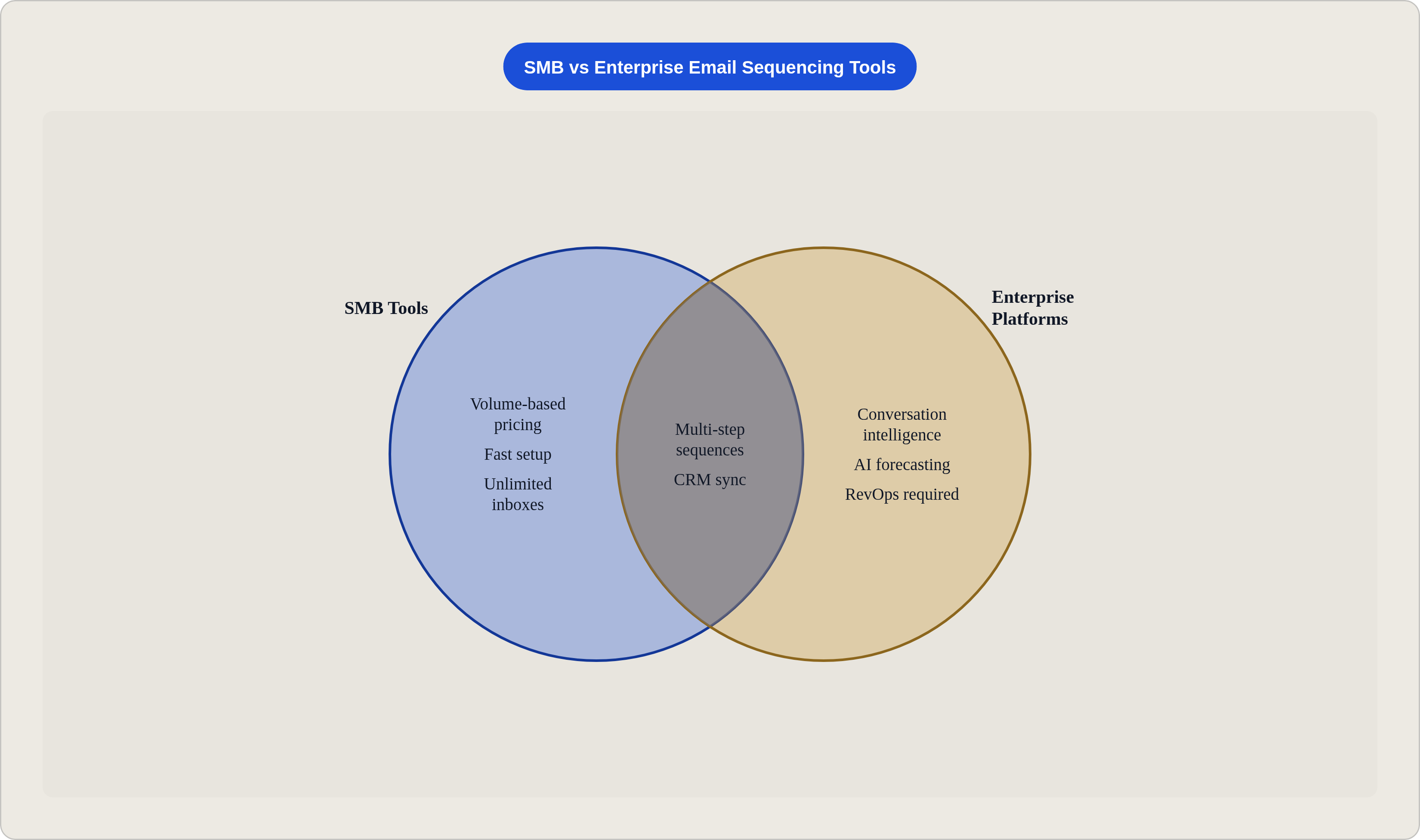
This section exists because enterprise platform names show up in most sequencing tool roundups, and SMB buyers need to understand what they're actually buying — and what the tradeoffs are.
Salesloft
Salesloft's total cost of ownership is high. Per-user annual costs can reach several thousand dollars when data costs are included. Well above SMB budgets for most teams of this size. The revenue intelligence, conversation intelligence, and deal analysis capabilities are genuinely sophisticated, particularly following the December 2025 merger with Clari. But those capabilities are only valuable to teams that have the pipeline volume and ops infrastructure to act on that analysis.
If you don't have enough deals in motion to generate meaningful conversation intelligence signal, the feature set you're paying for is doing very little work.
One factual evaluation input worth including in due diligence: a security incident in August 2025 compromised data from a large number of organizations, prompting a FINRA cybersecurity alert. That doesn't disqualify the platform, but security-sensitive buyers should ask about it directly.
For most SMB teams: the ROI case doesn't close until pipeline volume, headcount, and ops maturity reach mid-market levels.
Outreach
Outreach is built for teams with existing data infrastructure and ops support. For SMB teams without dedicated RevOps, the implementation and maintenance cost frequently exceeds the value delivered. The platform assumes a certain organizational maturity. If you're still building your outbound motion from scratch, Outreach is building for a version of your team that doesn't exist yet.
The Escalation Signal
There are clear indicators that it's time to consider moving into this tier:
- The team has outgrown per-seat pricing concerns. Headcount is large enough that per-user enterprise pricing becomes proportionally reasonable.
- Pipeline volume is high enough that conversation intelligence and AI forecasting generate actionable signal, not just interesting dashboards.
- A dedicated ops or RevOps function exists to configure, maintain, and analyze the platform.
Until those conditions are true, the enterprise platforms are mostly charging you for features you can't use yet.
How AI Personalization Features Actually Work Inside These Tools and Where They Fall Short
AI personalization is one of the most overpromised features in this category. Here's the relevant distinction that most demos gloss over.
Template-variable personalization is filling in a first name or company name from a field in your database. Signal-based personalization is generating a message that references something specific and recent (a funding announcement, a hiring surge in a particular department, a technology the prospect just adopted, a competitor move). These produce meaningfully different results.
Signal-based personalization requires three things:
- Real-time or near-real-time data feeds covering job changes, funding rounds, hiring activity, and tech stack shifts
- AI that can convert that raw signal into a relevant, specific message — not just fill a template slot.
- A workflow that connects the data source to the message generation to the sequence tool
Tools like Clay, Autobound, and Tofu are built specifically for this data-to-message pipeline. They can be layered on top of any sequencing tool in this guide, which matters because most sequencing tools (even the ones marketing AI personalization heavily) are doing something closer to smart template filling than true signal-based generation.
Per Salesforce's 2025 State of Sales report, sales teams using AI for email personalization see meaningfully higher reply rates than teams using manually written templates. But the key variable is the quality of context fed into the AI, not the AI model itself. Garbage in, generic message out.
The gap in practice is significant. Sopro's State of Prospecting 2026 report found that a large majority of sales teams report their outreach feels impersonal and irrelevant to recipients, and only a small fraction of teams personalize at the individual email level. Even though the reply rate data strongly favors doing exactly that.
The honest summary: most tools in this category offer AI features that are real but limited. If true signal-based personalization is central to your outbound motion, the sequencing tool is only part of the answer. The data layer is where the work actually happens, and it often lives outside the sequencing platform itself.