Email Deliverability Best Practices for New Domains
Build authentication, warm-up, and hygiene in order or your inbox placement collapses.
A brand-new domain has zero reputation. That's the whole problem, in one sentence. Deliverability isn't a checkbox in a settings menu, it's a track record built in a specific order: authentication first, warm-up second, hygiene and monitoring third. Skipping the order means every step after it gets built on sand.
Start with the two numbers founders confuse constantly. Delivery rate just means the receiving server accepted the message, full stop, nothing more. Inbox placement rate means the email landed somewhere a human will actually see it. Unspam.email's corpus analysis, cited in MessageFlow, found that a sender can post a 99% delivery rate while only 60% of those emails ever reach a visible inbox. Cold outreach pipeline dies in that gap, and it never produces an error message to explain why.
Missed inbox placement is what actually costs founders money. If a significant share of sends never reach the inbox, open rates, reply rates, and booked meetings all shrink accordingly, no matter how sharp the copy is. GlockApps data cited in Tie/Meettie found that 1 in 4 emails sent to Yahoo, AOL, Hotmail, and Outlook addresses failed to reach the inbox. For a seed-stage founder running cold outreach, that failure never looks like a deliverability issue. It looks like a messaging problem or a bad-market problem, so founders rewrite subject lines when the real issue is sitting quietly in their DNS records.
New domains get hit hardest because they show up with no track record. Providers can't tell a legitimate startup sending its first hundred emails from spam infrastructure spinning up overnight, so they treat both the same way: with suspicion. And the damage compounds fast. Skip warm-up in the first few weeks; the reputation hit can take six to twelve months to undo. Reputation runs as a behavioral score, rewritten with every send, every reply, every delete, every complaint.
Treat what follows as a build sequence. Authentication is the credential layer. Warm-up is the trust-building phase. Hygiene and monitoring keep the whole thing running once it's live. Do them out of order, or try to shortcut one, and everything downstream stops working the way it's supposed to.
The 2026 enforcement landscape every founder needs to understand before sending a single email
Gmail started enforcing bulk sender rules in February 2024. As of November 2025, non-compliant mail gets rejected, sometimes with a 550 error, sometimes with no spam-folder fallback. Microsoft rolled out matching requirements for Outlook, Hotmail, and Live in May 2025. Between the two of them, plus Yahoo, these providers cover roughly 90% of consumer and business email addresses worldwide. Then on May 21, 2026, the IETF made it official: DMARCbis was formally published as a set of new RFCs, replacing the old DMARC standard. Authentication is now baked into how the internet routes mail. It's baked into how the internet routes mail.
For anyone sending 5,000 or more messages a day to Gmail addresses, the rules get specific fast:
- SPF and DKIM are mandatory (for smaller senders, either one alone still passes)
- DMARC is mandatory, though starting at p=none is fine
- One-click unsubscribe, built to RFC 8058 spec, not a footer link that says "unsubscribe" in gray text
- Unsubscribe requests need processing within 48 hours
- Spam complaints have to stay under 0.3%, and honestly, 0.08% is where things start getting dicey
Google also retired the old Postmaster Tools v1 interface (that rollout got postponed once, but it landed) and updated the tooling to something blunter. Postmaster Tools v2 just tells you Pass or Fail. Fail means the mail risks permanent SMTP rejection. No dashboard to squint at, no gradient to interpret.
Then there's the AI layer, which changes the filtering game. Google has folded Gemini directly into Gmail, so there's now a model sitting between every outbound email and the inbox it's addressed to. That model reads behavioral and engagement signals that used to matter less than subject-line hygiene. It's reading behavioral and engagement signals that used to matter less than subject-line hygiene. PowerDMARC reports compliant senders average 89% inbox placement, while non-compliant senders see somewhere between 22 and 34% of their mail routed straight to spam.
Google calls a domain "new" if it hasn't sent more than 5,000 emails a day to personal Gmail accounts since January 1, 2024. New domains don't get a grace period under this framework, which forces reputation-building to happen faster than most founders plan for.
Authentication: the credential layer that must be in place before anything else
SPF tells receiving servers which mail servers are allowed to send on a domain's behalf. It needs to return a clean PASS, not a SOFTFAIL, because even a SOFTFAIL quietly dents Gmail's trust score without triggering an outright bounce. Keep the SPF record under 10 DNS lookups. Go over that hard limit, and SPF fails even if the actual sending IP is listed correctly in the record; this trips up founders who've stacked five different tools into one SPF include chain. For a new domain, the cleanest move is a single-provider include and nothing fancier than that.
DKIM works differently. It signs each outgoing message with a digital signature, and the receiving server checks that signature against a public key published in DNS. Keys need to run at least 1024-bit, though 2048-bit is the current standard and reads as a stronger trust signal to filters. Sign the From: header on every message, and rotate keys on a regular schedule rather than setting them once and forgetting they exist.
DMARC ties the two together, and this is where a lot of technically-correct setups still quietly fail. DMARC checks whether the domain in the visible "From:" field matches the domain that SPF or DKIM actually authenticated. A message can pass SPF, pass DKIM, and still fail DMARC if the visible From: domain doesn't line up, which can surface as SMTP errors from Gmail or Microsoft. Start at p=none with a rua reporting address so data starts flowing, then move through the progression: p=none, then p=quarantine, then eventually p=reject. Treat p=none as a waypoint, not a place to settle, and work toward p=reject as the end state.
BIMI sits one layer further out, and skipping it early is the right call. It lets a brand logo show up next to the sender name in the inbox, but it requires DMARC already sitting at p=quarantine or p=reject with pct=100. There are two certificate paths: a VMC, which needs a registered trademark and runs somewhere around $1,400 to $1,750 a year (resellers offer it from about $749), supported by Gmail, Yahoo, and Apple Mail; or a CMC, which skips the trademark requirement and works with Gmail. MessageFlow reports senders using BIMI logos see open rates up to 39% higher. None of that matters for a domain still in warm-up, though. BIMI is a reward for hardened authentication and earned reputation, not a starting move, and founders who chase the logo before the reputation exists are decorating a house with no foundation.
None of this guarantees inbox placement on its own: authentication proves identity, not trustworthiness, and messages can still land in spam without strong reputation and engagement signals. Authentication proves identity: that a message really came from who it claims to be from. Unspam.email's analysis, cited in MessageFlow, found fully authenticated mail still landing in spam more than 30% of the time. Reputation and engagement are what actually earn the inbox. Gmail blocks something like 15 billion unwanted emails every single day, and authentication is the mechanism that keeps legitimate senders out of that particular meat grinder, nothing more and nothing less.
Monitoring authentication health isn't a one-time setup either. DMARC's aggregate reporting (the rua tag) delivers regular XML reports showing every source sending mail on the domain's behalf, which catches unauthorized use or misaligned senders before they wreck reputation. Postmaster Tools v2's Compliance Status is worth a weekly glance, since it tracks authentication, unsubscribe compliance, and spam rate in one Pass/Fail view. Microsoft provides its own reputation and complaint reporting for Outlook, Hotmail, and Live separately, and it's a genuinely different data source, so checking it isn't optional just because Postmaster Tools already exists.
Domain architecture decisions that protect the primary domain from day one
Never send cold outreach from the company's main domain. Not once, not as a test, not "just this one campaign." If acmecorp.com starts blasting cold emails and the reputation takes a hit, invoices, contracts, and product updates from that same domain start landing in spam too. Reputation lives at the domain level, and each domain earns its own separately. A secondary sending domain works as a buffer for exactly this reason. Register one, authenticate it properly with SPF, DKIM, and DMARC, run it through warm-up, and only then scale volume on it. Rotating between two or three secondary domains for outreach is standard practice at this point.
Domain separation only helps if the infrastructure underneath it is separated too. Don't stack every secondary domain under one Google Workspace or Microsoft 365 account, because reputation problems bleed across domains sharing the same account and undercut the point of separating them. Spreading sending across multiple SMTP providers and IPs adds another layer of insulation on top of that.
Tracking links affect a domain's reputation directly, so route them through a branded CNAME on a subdomain instead of a generic shared tracking domain. Neither Google nor Yahoo requires this, but it keeps a domain's reputation from getting tangled up with every other sender using the same default tracking link on a shared platform.
Then there's the choice between shared and dedicated IPs, and it comes down to volume, not preference. Shared IPs make sense for lower-volume senders, though reputation there is a shared resource, so list hygiene has to be airtight or a domain gets dragged down by some other sender's bad behavior on the same pool. Dedicated IPs give full control over reputation, but they demand a proper warm-up, steady volume, and active monitoring to pay off. Most seed-stage founders on a new domain should start on shared IP and graduate to dedicated once monthly volume actually justifies it, not before.
How domain warm-up works and the specific ramp founders should follow
A new domain reads as neutral to every mail provider, and neutral gets treated with suspicion by default. A sudden spike in cold email from a domain with zero sending history looks identical, to a filter, as spam infrastructure spinning up for the first time. Warm-up builds a paper trail of normal, trusted sending behavior before the real volume shows up.
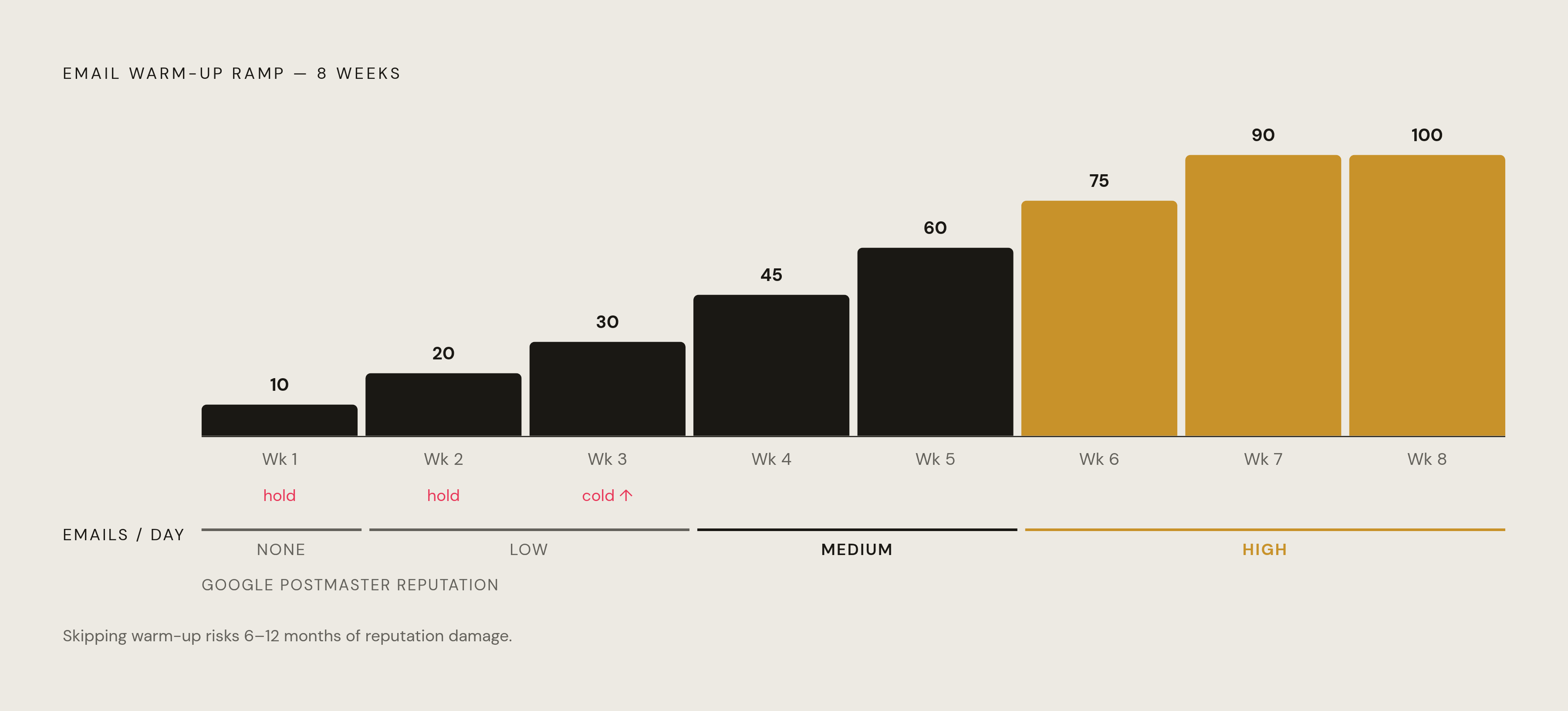
The ramp follows a fairly standard curve. Week one, keep it to 5 to 10 emails per day per inbox. Climb gradually from there, aiming for roughly 40 to 50 emails a day by week four. Hold off on real cold outreach until around week three. Cap campaign volume at 25 to 30 emails per inbox per day throughout the ramp. Once warm-up is done, 75 to 100 emails per inbox per day is a reasonable ceiling for B2B senders. Pushing past 30 emails per inbox per day before warm-up finishes is about the fastest route to a blacklist available.
The 2026 standard calls for 3 to 4 weeks minimum before any cold email goes out, and 6 weeks for a domain with zero sending history to build solid standing across Gmail, Outlook, and Yahoo. Skipping it can cause reputation damage that takes 6 to 12 months to climb back out of, which is a long stretch to explain to a board why outbound isn't producing meetings.
Google Postmaster Tools tends to follow a recognizable arc during this window. Week one usually shows "None," meaning there's not enough data yet to score anything. Weeks two and three typically move to "Low." Weeks four and five climb to "Medium." By weeks six through eight, a properly warmed domain should be a stable "High."" Per Instantly, the target during warm-up is 80%+ inbox placement on seed tests, building toward 90%+ real-world deliverability once authentication, warm-up, and monitoring are all running together.
What's actually being measured under the hood is behavior. Gmail and Outlook decide whether a sender can be trusted by tracking replies, opens, stars, and recipients dragging an email out of spam and into the inbox. MessageFlow notes that strong reputation tends to reach around 92% inbox placement, while a Validity Sender Score below 70 often drags placement under 50%, a steep cliff for a single score to control.
Fully automated warm-up tools are getting riskier, because Gmail and Outlook have gotten progressively better at spotting artificial warm-up networks and penalize accounts that rely on them. Since 2024, Gmail and Outlook have gotten progressively better at spotting artificial warm-up networks, the kind where bots email each other in a closed loop to fake engagement, and they penalize the domains involved for it. A 100% automated approach is a gamble at this point, not a shortcut. The hybrid that's held up better splits warm-up volume roughly 50 to 70% automated and 30 to 50% genuine manual sends to real contacts, at a modest monthly cost plus 15 to 30 minutes a day of actual human sending. Warm-up doesn't really end, either. Keep a slice of daily volume dedicated to ongoing warm-up and test sends indefinitely, and when it's time to scale, add another warmed domain to the rotation rather than dumping more volume onto the one that's already working.
List hygiene and content signals that protect reputation once warm-up is complete
Everything built so far, authentication, domain separation, a careful warm-up ramp, gets undone fast by a sloppy list. Every bounce, every spam complaint, every email sent to an address that hasn't opened anything in eight months chips away at the exact reputation score that took six weeks to build. Warm-up earns trust. Bad list hygiene spends it, and it spends it faster than warm-up ever earned it.
Bounces come in two flavors, and only one of them is truly disqualifying. Hard bounces, addresses that don't exist at all, need to come off the list immediately, no exceptions, because repeated sends to dead addresses read to filters as carelessness at best and list-buying at worst. Soft bounces are murkier and often resolve on their own, but a pattern of repeated soft bounces to the same address should trigger a decision rather than getting waved through.
Spam complaints do damage out of proportion to how rare they are. A handful of complaints on a small daily volume can push a complaint rate over that 0.3% ceiling fast, and once a domain crosses it, providers don't forget quickly. Suppressing anyone who complains, permanently, is table stakes. It's table stakes.
Engagement segmentation matters just as much as list cleanliness. Recipients who haven't opened or clicked anything in a long stretch belong in a separate, lower-frequency track, or off active sending entirely, rather than getting hit with the same cadence as an engaged lead. Filters watch engagement ratios closely, and a list padded with cold, unresponsive contacts drags down the exact metrics that decide whether the next campaign lands in the inbox or the spam folder.
Content signals round out the picture. Spammy trigger phrases, excessive links, image-heavy emails with almost no text: all of it still registers with modern filters, even the more advanced ones. Subject lines that read as manipulative or over-promising get penalized harder than a plain, direct line ever will. None of this replaces authentication or warm-up. It's what keeps the reputation earned through those two steps from leaking out the side once real volume starts flowing.